CapFlow Booking / Booking guide
How to sell classes and workshops on Shopify
Sell a place in Tuesday’s class as easily as a product in your shop. CapFlow adds dates, available places and group sizes to the booking, then sends paid sessions through your Shopify cart and checkout.
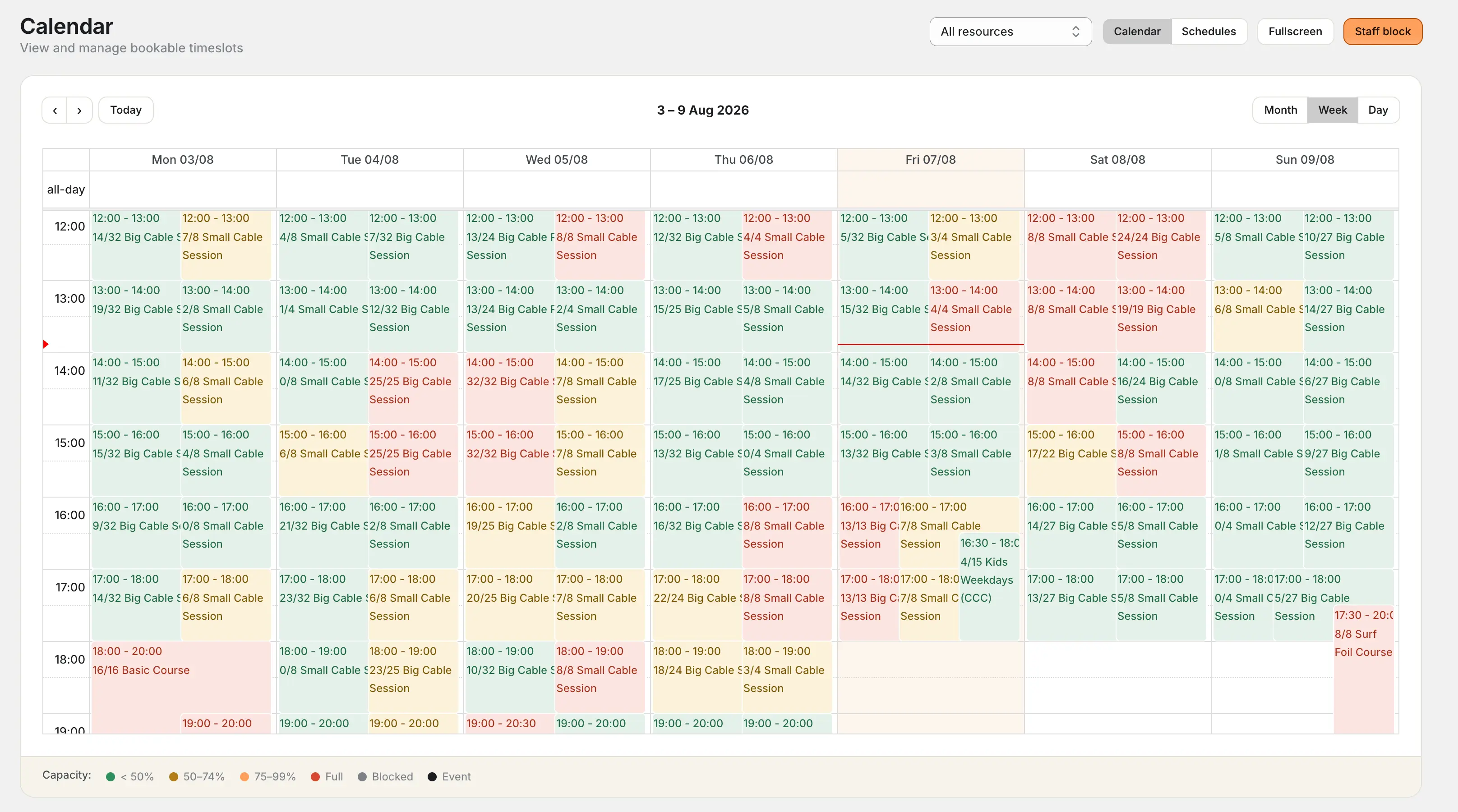
Start with one class, one room and one schedule
For a first launch, choose a class customers can book for a single date. A weekly yoga class, a Saturday ceramics workshop or an evening tasting all fit this pattern. Decide the duration, price per person and maximum number of guests before you set up the booking. The in-app Setup guide follows Offer, Capacity, Times, Product and Check setup; it can reuse an existing product and matching shared times.
For example: a one-hour class with 12 places at $18 per person. A customer booking two places pays $36 and uses two of the session’s 12 places. The example is simple, but it covers the important distinction: you are selling places in a particular session.
1. Create the class as a Shopify product
Give the product a clear title, photos and the details guests need before they book: what happens, where to meet, how long it lasts and what to bring. In CapFlow, create a service and connect it to that product and its price variant.
Start with one price per person. If you need adult and child prices or different durations, map the appropriate Shopify variants in Services and pricing. Check every price you plan to offer before publishing.
2. Add the room or equipment people will share
Create a resource for the space used by the class, such as “Studio 2”. The resource connects the service to its schedule. The capacity limit belongs to the individual session, so the same space can have different limits at different times.
If several products sell access to the same session, plan their shared capacity together. Giving each product its own independent stock count can leave you selling more places than the room can hold.
3. Generate the dates and set the number of places
Create a season with a date range and weekly schedule rules. Choose the resource, start and end times, and session capacity. CapFlow generates the individual timeslots from those rules. Check the resulting dates in the calendar before opening sales.
For a class with 12 public places, use a capacity of 12 without reserving a member allocation. Use service-specific sessions when a time should only be bookable for that class. The scheduling guide covers the configuration.
4. Put the booking widget on your store
Add the CapFlow app block in your Shopify theme editor and select the service. The compact widget walks guests through the available dates, times and number of people. A class catalogue gives customers a way to browse several activities first.
Place the widget alongside the class description, price and practical details. Match its colours, spacing and borders to the rest of the shop, and check the layout on a phone. Follow the widget setup guide for the theme steps.
5. Test a booking for more than one person
Choose a future session, add two places and enter sample guest details. After selecting Add booking, check the booking summary, then continue to the cart. For the $18 example, the line quantity should be two and the total $36 before any taxes or discounts.
Use your store’s test payment setup to verify checkout. Confirm that the booking shows the correct date, time and party size in CapFlow, and that the remaining capacity reflects the two places. Also test the last available places and a fully booked session.
What the customer clicks through
- Choose a class. Open its product page or select it from the class catalogue.
- Pick a date and time. See the sessions available for that class.
- Choose the party size. Add guest details and add the booking.
- Review and pay. Check the booking summary, open the cart and use Shopify checkout.
The Studio demo lets you try this flow before installing the app. It contains sample classes and guest data.
Can I sell a course across several weeks?
You can offer recurring class dates, and customers can add separate sessions to the same cart. CapFlow does not currently turn nonconsecutive weekly sessions into one course enrolment. If you need one purchase to enrol a student in an entire term, check that requirement before choosing your setup.
What happens when several people book at once?
CapFlow reserves capacity during the booking flow and checks the number of people against the session’s available places. Unfinished paid bookings release capacity according to the configured expiry. Learn how people, holds and shared session capacity fit together.
What happens when a class is full?
On Growth and higher plans, enable Waitlist so customers can request their chosen group and consecutive duration. When enough places open, CapFlow reserves the whole session and emails a timed offer. The customer still completes booking and any Shopify payment; separate weekly course dates and Event signups are outside this queue.
What does it cost to start?
The free plan includes one resource, one service and 10 bookings per month. Growth is $15 per month for up to 500 bookings, with unlimited resources and services. Paid plans include a 14-day free trial. See all plans and annual prices.
For examples tailored to a maker studio, read booking for workshops. If you are ready to configure the app, follow Getting started.